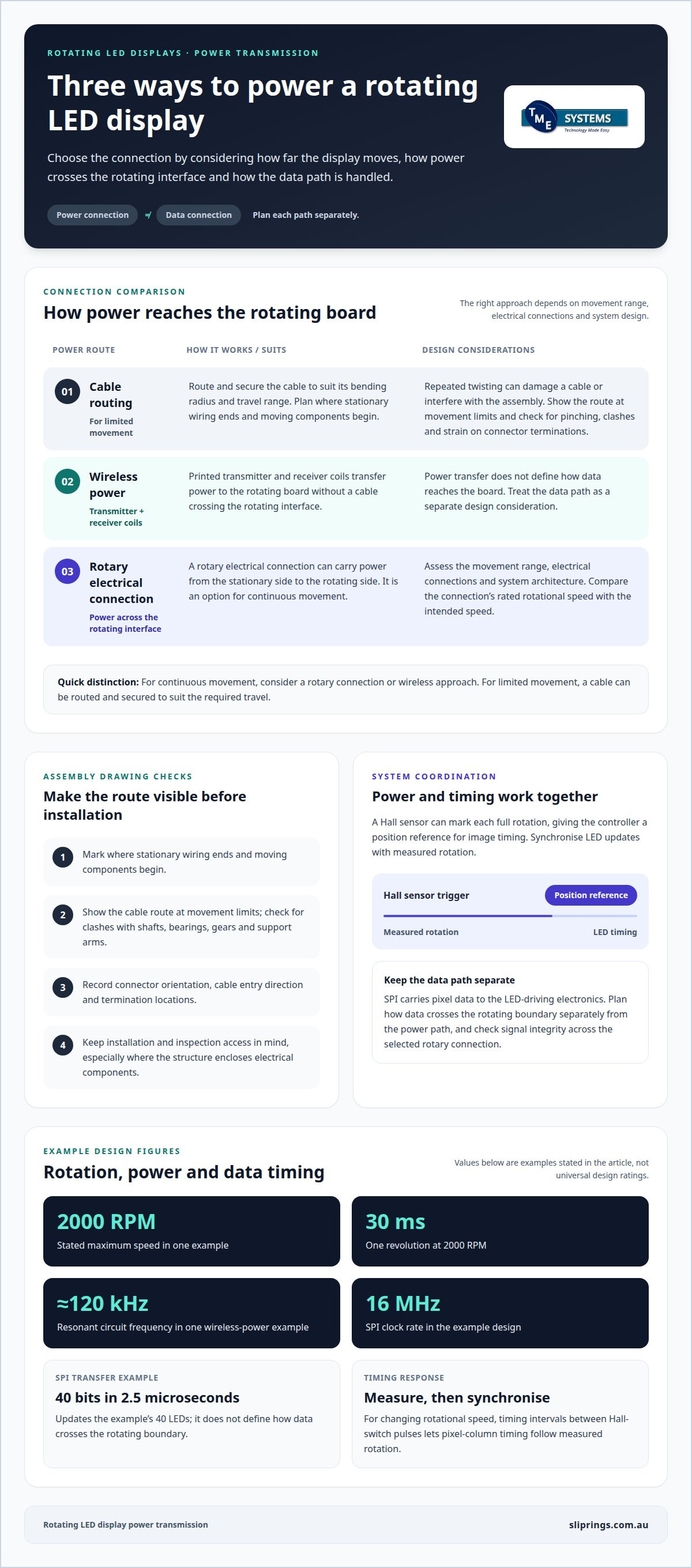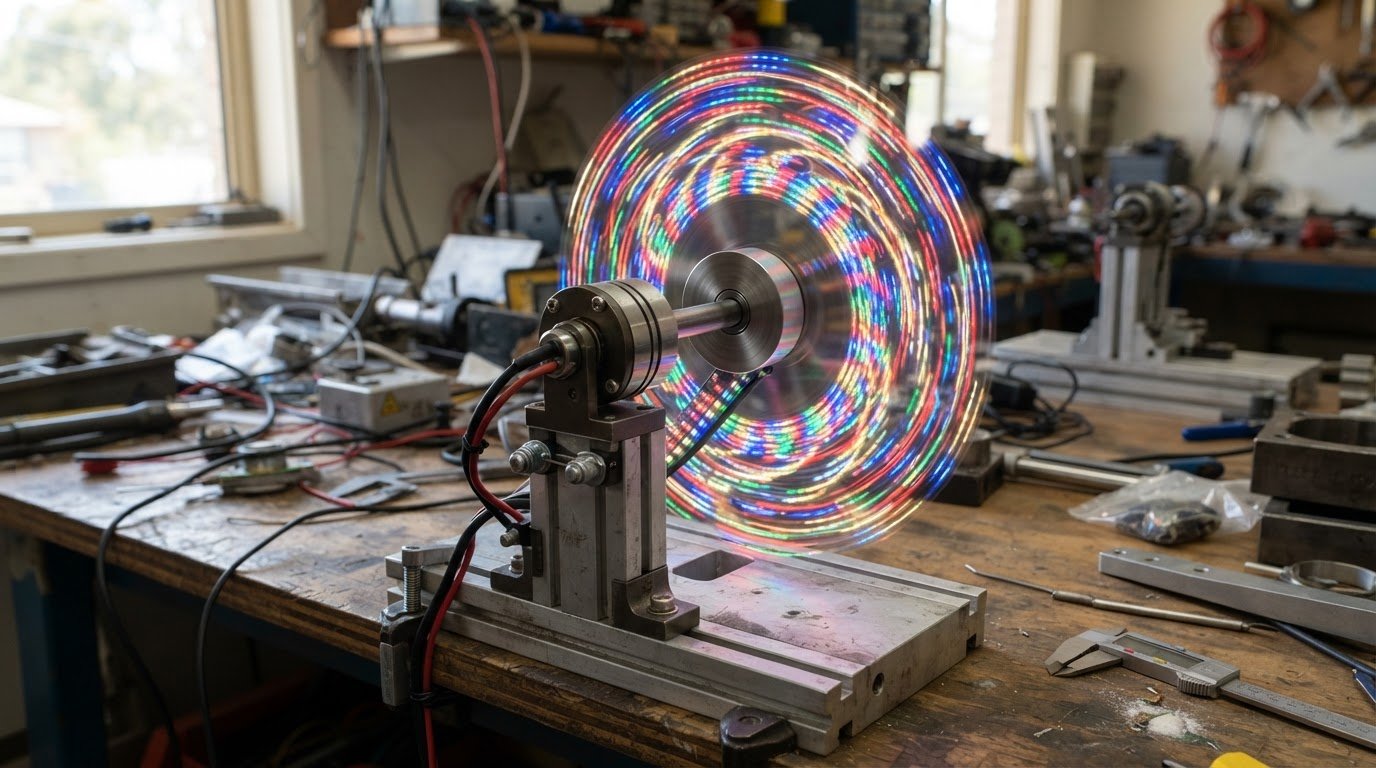
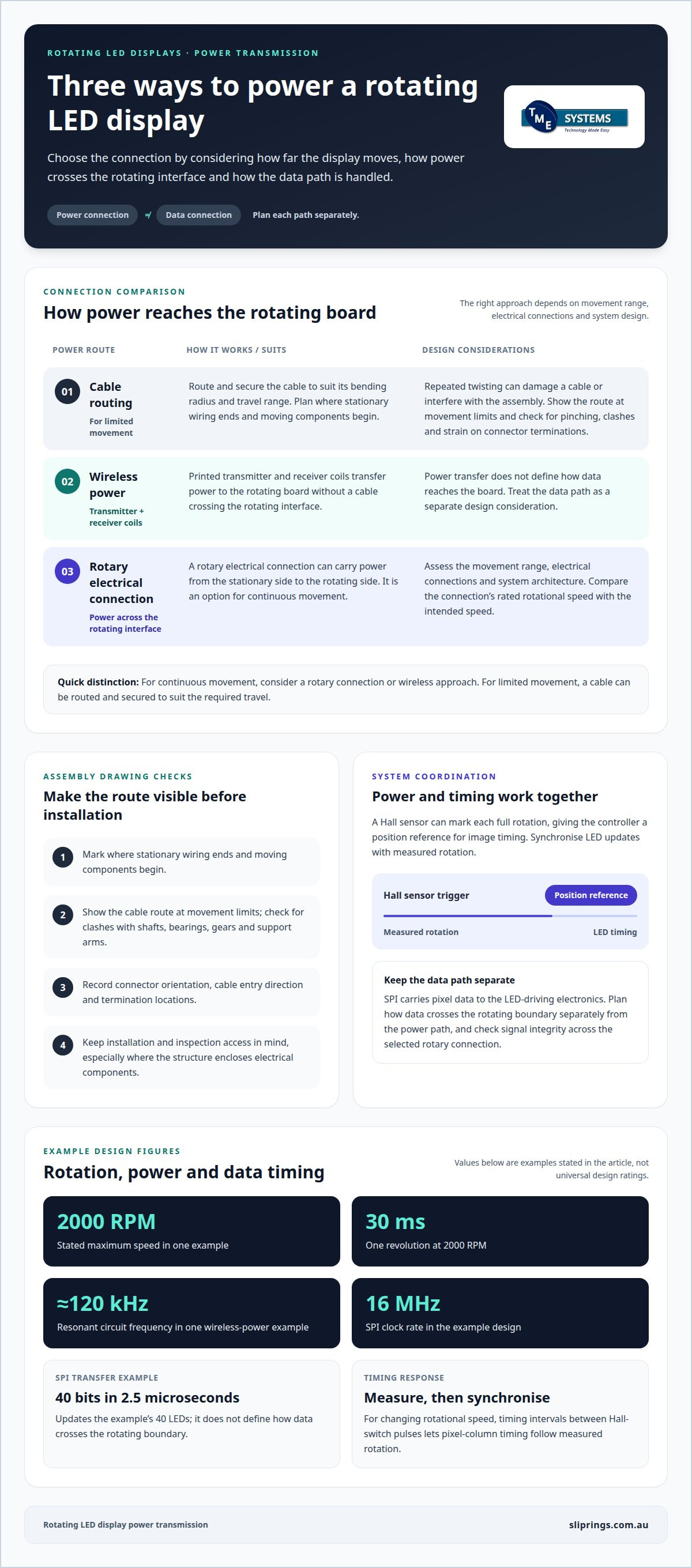
A rotating LED display does not always need a cable running directly to its board. Power transmission for rotating LED displays can use wireless transmitter and receiver coils or a rotary electrical connection, depending on the rotation range, electrical connections and system design. The rotating board then uses that power to operate its LEDs and control electronics.
It is easy to focus on the moving image, but the power supply and its connection to the rotating board are just as important. Understanding the connection helps clarify whether wireless power, cable management or a slip ring best suits the design.
This guide explains how the display produces an image as it rotates, how power and signals reach the board, and what to consider when choosing a connection method. Working examples show how these principles apply to different display designs and settings, from compact visual effects to larger installations.
Key Takeaways
- Understand how rotation, LED control and image timing work together to create a stable display.
- Compare cable routing, wireless power and rotary electrical connections against the display’s movement and wiring needs.
- See how display purpose and viewing distance influence the design choices for rotating LED installations.
- Identify the key inputs for slip ring selection, including voltage, current, signal type, circuit count and mounting arrangement.
- Learn how TME Systems’ slip ring range and technical application consulting can help match a rotary connection to your project.
How Does a Rotating LED Display Work?
A rotating LED display builds an image by switching LEDs as the board moves. Each position contributes part of the visual output. One example uses two rows of 20 LEDs, controlled by five cascaded 8-bit shift registers. A Hall sensor marks each full rotation, giving the controller a position reference for image timing.
Power and data can take different paths. Printed transmitter and receiver coils transfer power wirelessly to a rotating board. A rotary electrical connection can carry power across the stationary-to-rotating interface. The right approach depends on the movement range, electrical connections and system architecture. Designing power transmission for rotating LED displays means assessing those requirements alongside the mechanical arrangement.
At a stated maximum speed of 2000 RPM, one revolution takes 30 ms. The controller uses the Hall sensor’s trigger to synchronise LED timing with board position. In one wireless-power example, the resonant circuit operates at about 120 kHz. These values show how rotation and electrical timing must coordinate to keep the visual output aligned.
SPI carries pixel data to the LED-driving electronics. In the example design, the interface runs at a 16 MHz clock rate and transfers 40 bits in 2.5 microseconds. That updates the 40 LEDs, but doesn’t define how data crosses the rotating boundary. Plan the data path separately from the power path when specifying power transmission for rotating LED displays.
Which power option suits indoor, outdoor and high-speed displays? Wireless power or a rotary electrical connection may suit either setting. Rotation range, circuit requirements and system architecture guide the choice. For high-speed operation, compare the connection’s rated rotational speed with the intended speed, then synchronise display timing to rotation.
What Australian rules apply? Electrical installations are governed by the wiring requirements in AS/NZS 3000:2018. Consider these requirements when designing the display’s supply, wiring and installation.
How can data reach the display without interference? Define the data path at the interface, manage wiring routes and synchronise updates with the Hall sensor’s rotation trigger. For SPI, ensure clock timing and signal integrity are suitable across the selected rotary connection.
What does continuous rotation mean for cables and reliability? A cable twisted repeatedly can become damaged or interfere with the assembly. For continuous movement, use a rotary connection or wireless approach. For limited movement, route and secure the cable to suit its bending radius and travel range.
Working example: Situation: a rotating board needs power without a cable winding around its shaft. Action: printed transmitter and receiver coils transfer power wirelessly. Result: the board receives power without a cable crossing the rotating interface, while data remains a separate design consideration.
Working example: Situation: LED columns drift as rotational speed changes. Action: time the intervals between Hall-switch pulses and adjust pixel-column timing. Result: display timing follows measured rotation instead of relying on a fixed interval.
Cable routing and rotary electrical connections
Plan the cable route on the assembly drawing before fixing the display structure. Mark where stationary wiring ends, where moving components begin and how cables enter the rotating module. This reveals potential clashes with the shaft, bearings, gears and support arms during design, before components are installed.
Routing also depends on the display layout. A central column may leave little room for cable entry, while a frame-mounted assembly may allow wiring to approach from the side. Record connector orientation and termination locations on the drawing. Keep installation and inspection access in mind, especially when the structure encloses electrical components.
Where a cable passes between fixed and moving parts, show its route at the movement limits. Check that guards, covers and adjacent display sections do not trap or pinch it. Fixing points should support the route without putting force on connector terminations. Cable management can keep wiring organised along a defined mechanical path.
How do you install and maintain power transmission for a rotating LED display? Document the wiring route and connection points, then mount and secure components according to the assembly drawing. During planned maintenance, inspect cable supports, connector terminations and the surrounding structure for movement, wear or interference.
Working example: Situation: an LED module is mounted beside a rotating support arm, with a connector facing the arm. Action: the installation drawing changes the connector approach and shows the cable route with the arm at its movement limits. Result: the route avoids the arm’s travel area and preserves access to the connection.
Working example: Situation: a rotary electrical joint must fit within a compact shaft assembly. Action: the design places the joint around the shaft and records the cable entry direction and mounting interface. Result: the joint’s position is coordinated with the frame and nearby components before the assembly is built.
Mounting details can shape the connection layout. A Prosper Rotation Slip Ring may be assessed against the shaft arrangement, installation space and required mounting style. Keep the interface accessible in the mechanical layout, and show the stationary-side and rotating-side terminations clearly. That drawing gives installation and maintenance teams a shared reference for the completed assembly.
For a final layout review, compare the assembly drawing with the installed route. Confirm that connectors remain reachable, covers fit correctly and moving sections have clear travel. These checks help ensure the cable-management arrangement and rotary connection suit the actual structure, rather than relying on a schematic that misses physical obstructions.
Display applications
Rotating LED displays suit installations where movement contributes to the visual effect. Applications include exhibit features, promotional displays and interactive devices. The intended setting determines viewing distance, image content, structural support and operating pattern. A display designed for a fixed indoor exhibit has different mechanical demands from a unit that moves, lifts or opens during operation.
For a museum exhibit, start by considering how visitors approach and view the display. Then assess its dimensions, rotation range, support structure and the space around moving sections. Close viewing makes surface detail and stable operation especially relevant. The design should also allow installation and maintenance access without obstructing the exhibit or its moving components.
Situation: A rotating display platform needs a simple visual feature. Action: A documented platform design used 14 bright white LEDs, with its rotating structure carrying the light sources. Result: The platform produces a moving visual effect; its support, drive and electrical connections must suit the rotating load and intended operation.
A three-sided display introduces specific geometry. With faces evenly distributed, adjacent faces sit approximately 120 degrees apart. That spacing helps define the rotating structure and the clearance required around each face. If the display’s mass is unevenly distributed, rotation can create additional forces that become more noticeable at higher speeds. Balance and structural layout therefore matter alongside the image design.
Shaft and bearing alignment also affect performance. Misalignment can increase friction and wear, changing how the assembly rotates. Before choosing drive components, establish the display weight, centre of gravity, shaft arrangement, bearing load, gear relationship, rotation speed and installation space. These inputs connect the visual brief to the mechanical requirements.
Some installations combine rotation with lifting or opening sections. A rotating-and-lifting display needs its lifting mechanism and rotary drive coordinated so movement in one direction does not conflict with the other. Opening sections also need enough clearance from adjacent panels throughout their travel. Mapping movements early helps prevent interference between the display structure and nearby components.
Use this sequence to turn an application into design requirements:
- Define the viewing position and the visual content.
- Record the display’s weight, centre of gravity and movement range.
- Map the shaft, bearings, drive and surrounding clearances.
- Coordinate any lifting or opening movement with rotation.
- Plan power and signal connections around the complete movement.
For an exhibit, promotional installation or moving display, this sequence helps align the visual objective with the mechanical structure and electrical design. Each application still needs its own assessment: a balanced three-sided display, for example, has different load conditions from one with unevenly positioned panels.
Power supply and rotating display board
Size the board supply for the LED load and control electronics, and treat motor demand as a separate load in the electrical plan. Both the LED driver’s current limit and the power supply’s output capacity matter. The supply must support the intended brightness without exceeding the board components’ limits.
One rotating LED sphere example uses 270 Ω resistors and has a forward peak LED current of 75 mA. With 1 kΩ resistors, its forward peak current is 20 mA. These figures show how component selection changes the LED load. They are examples for that design, not universal settings for every rotating board.
Situation: A board’s LED current demand approaches the limits of its driver components. Action: Compare the current setting for each LED with the shift-register limits; in one example, each of five registers can supply a maximum of 160 mA. Result: The designer can assess whether the driver arrangement suits the selected LED current before finalising the board.
Brightness control also affects electrical demand. A rotating LED sphere example supports eight brightness levels through PWM. Because the control method changes how LEDs operate over time, assess the supply and driver against the chosen setting. Do not assume maximum brightness and lower settings place the same demand on the power system.
Keep motor requirements as a separate line item in the supply schedule. The motor drives the mechanical assembly, while the display board powers the LEDs and control electronics. Separating these loads makes it easier to identify each component’s supply and assess changes to motor operation without confusing them with LED current requirements.
Situation: A prototype needs adjustable brightness while preserving a defined motor supply arrangement. Action: Document the LED resistors, driver limits, brightness-control method and motor supply as separate design inputs. Result: The board’s electrical requirements can be reviewed alongside the motor’s, with each load and control function clearly assigned.
Include heat in the assessment. LED current, driver operation and power conversion all affect the board’s thermal conditions. Position heat-producing components with their surroundings in mind, then assess thermal management under the intended operating pattern. A board designed for brief demonstrations may face different demands from one intended to run continuously.
Before building the assembly, prepare a board-level schedule covering LED configuration, current setting, driver capacity, brightness control, motor supply and heat sources. Use the component values for the actual design, then check that the selected supply and board layout support the intended operation. This gives the electrical and mechanical teams a clear basis for integrating the rotating display.
How do you size a slip ring for an LED display’s voltage, current, and data signals?
Start with the electrical load and rotating assembly, not the slip ring’s physical size. Record each supply voltage, the current drawn by each circuit, signal type, rotation speed, mounting arrangement and operating environment. These inputs define the required circuit count and help distinguish LED power paths from control and data connections.
For current, calculate the demand of the loads that operate at the same time. One rotating-display example sets each LED current to 20 mA, while its five shift registers can each supply a maximum current of 160 mA. Those values describe that design, not a universal slip-ring rating. The selected circuits must suit the actual loads and operating conditions.
- List the voltage and operating current for every power circuit.
- Separate LED supply paths from control, sensor and data circuits.
- Record the signal interface and its transmission requirements.
- Match circuit count and mounting form to the shaft and available space.
- Compare operating speed and environment with the slip ring’s ratings.
Voltage selection must account for the equipment connected across the rotating interface. A supply circuit and a low-level signal circuit serve different functions, so do not treat them as interchangeable paths. Include return paths in the circuit plan, then confirm the arrangement suits the display controller, LEDs and stationary-side electronics.
Assess data separately. SPI, encoder feedback and other control signals can have different interface requirements. For high-speed data transmission, consider the signal format, transmission rate, electrical noise and routing of power alongside data circuits. Separation or suitable shielding may help reduce coupling, but the right design depends on the interface and assembly.
Working example: Situation: a display combines LED power with a microcontroller data link. Action: the designer records each circuit’s voltage, load and signal type, then assigns suitable slip-ring paths. Result: power and data requirements are evaluated separately, and the circuit count reflects the complete connection plan rather than the LED supply alone.
Mounting also affects selection. A through-bore slip ring fits over a shaft, while an end-mounted form suits a different arrangement. Check shaft dimensions, available installation space, cable entry and support method together. For a high-speed assembly, compare the rotational speed rating with the intended operating speed, and consider temperature because thermal derating can reduce allowable current.
Before specifying a unit, assemble the electrical schedule and mechanical drawing. Include operating voltage, simultaneous current demand, signal type, circuit count, speed, mounting and environmental conditions. This gives selection a defined basis and helps identify mismatches between the display board, controller and rotary connection before installation.
TME Systems: Mercotac Slip Rings
TME Systems Pty Ltd helps match rotary electrical connections to an application’s circuit count, current, voltage, speed, mounting style and environment. If your LED display needs a slip ring rather than wireless power or managed cabling, these project details provide a practical starting point for technical application consulting.
Mercotac Slip Rings are one option in TME Systems Pty Ltd’s range, alongside Meridian Laboratory, BGB Innovation and Prosper Rotation Slip Rings. The right selection depends on the display’s electrical and mechanical requirements, including how power and signals cross the rotating interface.
Prepare your circuit schedule and mounting details to discuss how a slip ring can fit the design. Contact TME Systems Pty Ltd to discuss your rotating LED display application.
Move your rotating display design forward
Before finalising a design, bring the electrical and mechanical assumptions together in a shared project brief. Describe the display’s intended operation, installation environment, movement, signal needs and available mounting space. This gives the engineering discussion a clear starting point and helps keep the display board, drive system and rotary connection aligned as the design develops.
Power transmission for rotating LED displays is not an isolated component decision. The display’s motion, electrical loads and control signals must work together as a system. If the design is still changing, note which requirements are fixed and which remain open. This distinction can make the next technical review more focused.
TME Systems can help assess slip ring requirements through technical application consulting. Contact TME Systems about your rotating display application to discuss the design and its rotary electrical connection. A clear set of project requirements is a practical first step towards selecting a suitable approach.
Frequently Asked Questions
What needs to be considered when designing the rotating mechanism?
Plan how the display starts, runs and stops, including movement sequences controlled by its program. Check that the drive response suits the intended operation and that control changes do not create abrupt movement. For an installation with moving panels, map the opening and closing sequence, then test it against the complete assembly. A commissioning review can reveal control conflicts before regular operation.
How is power transmitted to rotating LED displays?
Designers can transfer power through a rotary connection, couple it across a rotating interface or supply the display from an onboard battery. The choice depends on whether the display needs an external supply during operation and whether the rotating section also needs connected control signals. A self-contained display can carry stored energy, while a permanently installed unit may need a continuous connection to its stationary supply.
What power transmission methods suit rotating LED displays: slip rings, rotary transformers, or batteries?
Slip rings suit systems that need electrical circuits to cross a rotating joint. A rotary transformer transfers power across the interface without direct electrical contact, while a battery keeps the supply onboard. Consider the display’s operating pattern and whether it must run without pauses for battery charging. Also assess whether data needs to cross the joint, since the selected power method may not provide the required signal path.
What project information helps assess a rotating display application?
Prepare a drawing of the complete assembly, a description of its operating sequence and the intended installation environment. Note how the display is accessed for inspection and whether sections move independently. Include controller and motor documentation where available so the electrical and mechanical interfaces can be understood together. Clear project records help keep engineering decisions aligned as the design progresses from concept to integrated assembly.
What are the fire, overheating, wear, and electrical shock risks of rotating display power systems?
Electrical faults, damaged insulation and overheated components can create hazards in a rotating display. Contact wear or a mechanical fault can also affect operation. Reduce risk with suitable electrical protection, secure enclosures and thermal management matched to the assembly. Keep cables and components clear of moving parts, and isolate the system before inspection or maintenance. Regular checks should look for heat damage, loose connections, worn insulation and unexpected contact.